While moving stuff around on my computer, my STB TV PCI card from 1996 broke. The metal simply snapped due to age.
It had out-lasted half a dozen computer replacements, and finally wore out.
To replace it, I purchased the KWorld PlusTV HD PCI 120.
The TV card has an Analog Tuner, a Digital Tuner, an FM Tuner, a remote, and supports watching HDTV.
Using it reminds me of my STB TV PCI from a few years back - basically I’m left looking for software that actually works with it. The bundled Media Center software works Ok, and the only other program I’ve gotten to work with it is called “WatchHDTV”.
Because it’s a pretty new card, and there aren’t many references to it online, I decided to put up a review page on it - which helped me decide to put up a general review page as well.
The Reviews page: http://xenomorph.net/?page_id=516
The KWorld PlusTV HD PCI 120 review page: http://xenomorph.net/?page_id=519
http://www.newegg.com/Product/Product.asp?Item=N82E16815123007
$17 shipped.

I thought it looked nice, it was cheap, it had 7 ports, did USB 2.0, and even had external power.
I get it, and find out the thing is a fucking lightshow. I can’t stand the constant flashing it does. I’m probably going to break it apart and tear out the LEDs.
If you like brightly flashing stuff, this may be fine. For me though, it’s giving me a headache.
UPDATE
I finally brought the thing to work with me.
It’s a piece of shit. Pure shit. USB standard says 500 mA per port. This can’t provide that even with the external power supply plugged in. The unit itself pulls up to 500 mA from the system, and the power supply provides an additional 1000 mA. Seven ports will pull up to 3500 mA though.
There was *no way* I was using anywhere close to 3.5 A on this device. I tried plugging in an external hard drive, mouse, two thumbdrives, and a USB WiFi adapter.
Half of the stuff I plugged into it wasn’t recognized by Windows. With just 5 items plugged in, NOTHING worked. With one device, because it was getting so little power, it’s drivers actually crashed Windows on me.
My external hard drive wouldn’t work at all. Even when the hard drive was plugged into an external power supply itself, it couldn’t pull anywhere near 500 mA from it, so Windows couldn’t see it. Even if it was the only item on the USB Hub, it still wouldn’t work.
It seems to work ok when I have JUST a mouse and a thumb drive plugged in - but what the hell is the point of buying a hub with a lot of ports if I can’t use them?
Pure crap, stay away from this product. It’s ugly and doesn’t work right.
DOUBLE EDIT
Since it doesn’t work right, I went through the RMA process at Newegg.
The item cost $12 w/ $5 shipping. Obviously I wouldn’t get the $5 back, but $12 isn’t so bad.
The Newegg automated RMA said there would be a $2 restocking fee - which is dumb, because if it doesn’t work, why restock it?
But that was ok, I’d still get $10 back.
Newegg had something for me to click to get a UPS label to send it back. UPS wanted $8 to ship it.
I’d end up getting $2 back then.
Well crap, if I’d only get $2 back, I may as well keep it and not go through the trouble of sending it back. After all, not having the $2 but having a sorta-working hub sounds like a deal.
I called up Newegg, and mentioned the crazy cost of things - they told me they would just give me my money back! They understand that going through all the time and effort and cost to send it back just isn’t worth it.
To recap, Newegg rocks!
Give them a visit and buy something! Newegg.com
TRIPLE EDIT
Since Newegg basically told me to throw it away after giving me a full refund, I decided to try and “alter” it a little.
I pulled the 8 LEDs off of it, and put one of the dimmer LEDs back in the middle where the flashing one was.
If you have one of these ugly things, it’s not too hard to do. Just use a flat-headed screw driver and kinda wedge the LEDs up until they pull out. You can then plug them into different locations.
This makes the device less painful to look at, and possibly reduces the power consumption of the device, allowing more for the actual USB devices.
yesterday i spent a few hours taking apart and working on a broken ThinkPad T23. i checked all connections, applied Arctic Silver to the CPU, replaced an inverter board under the screen, soldered an inductor to the motherboard, added additional padding under the motherboard, and then super-glued a busted part of the case. all that allowed the system to boot up and work fine after having been off (and unable to even power on) for almost a full year. i’m actually quite proud of myself for getting my T23 working again.
my T23 has these specs:
Pentium III 1.13 GHz
512 Megs RAM
8x DVD rom
30 Gig HD
built in WiFi
so, its a pretty nice system. i was heart broken when it stopped working last year after i had put so much time and money into fixing it up.
i have a stack of ThinkPads (about 6), and have spent a LOT of time looking at hardware maintenance manuals and researching them online.
NONE of the systems worked when i got them. i purchased about $400 in parts off eBay to get them all working. things like memory chips, optical drives, floppy drives, LCD screens, batteries, AC adapters, keyboards, palm rest/bezels, etc.
most came from a company that had tossed them. many were out dated (three are Pentium 1 systems), and one was very damaged. the T23 had been dropped, so its bezel/case was cracked and the screen would flicker. the keyboard had some chemical damage, and many keys were melted and unreadable.
when i got the T23, i purchased ram, DVD drive, new keyboard, and a new bezel for it. i also re-soldered the inverter board on it to fix the flicker. after all that, the system worked *great* … until one day it died.
it would power on, but then it would just sit, and never post. the fan on it would kinda pulse, fast then slow, over and over.
i did some Google searches, and found it was an issue with other T23 systems, and i read that it could be fixed by soldering a loose part back on the motherboard. after taking apart the system, i couldn’t locate the broken part. so the laptop just sat.
recently, after coming across another ThinkPad that i have been fixing up, i found a web site called thinkpads.com. on the forum on that site, i found more info regarding non booting T23s, including better pictures of the problem part - and i also read that the problem piece was on the *bottom* of the motherboard (where i did not look). so when i took apart my T23 last night, i removed the motherboard completely, checked under it, and actually found the exact broken part shown in the pictures.
the thread that helped me is here:
http://forum.thinkpads.com/viewtopic.php?t=27245
the other day, while playing World of Warcraft, my monitor turned off. i had no clue why. i ended up restarting my computer after many random key presses did nothing.
after getting back in the game, my mouse cursor turn into a distorted block, and then my monitor turned off again.
this made me think something was up with my video card. i popped the side of my case off, and noticed the fan on my MSI Radeon 9800 Pro wasnt spinning! the card was overheating. i gave the fan a little push, and it started to spin slowly, and then stopped again. i gave it another push, and it started to spin slowly, and kept going this time.
i started to look online for a replacement fan. it didnt look like a standard fan on the video card. it was some weird fan screwed into MSI’s even weirder heatsink.
after some Googling, i found out that some people had put the “VGA Silencer, Rev 3″ on their MSI Radeon 9800 Pro. NewEgg had one for $20 shipped, so i ordered it.
i got the VGA Silencer in about a day (NewEgg is awesome). i took the heatsink off my 9800 Pro, and popped on the VGA Silencer.
after booting up the system, i was getting “artifacts” (little colored sparkles). that usually means the card is overheating, but it was at the default clock speed.
i pulled the card, and removed the VGA Silencer, i could see from the tiny amount of thermal compound on the heatsink that it wasnt making good connection with the video card’s core. so i re-applied some Arctic Silver, put the VGA Silencer on again, and i made sure i had it on there good and tight.
after booting up, i started to get a corrupted mouse cursor, and the system locked up. i pulled the card again and saw even less thermal compound on the heatsink. like it was barely touching, and i knew the core needed to be fully touching the heatsink for it to be effective.
so i put the VGA Silencer back on, and tightened it a lot more - and then *SNAP*! i had crushed the core of the video card. when i took off the VGA Silencer, i noticed that there still wasnt much compound on it - even with enough force to crush the core, it still wasnt tight enough to make good contact.
obviously the VGA Silencer, Rev 3 that i was told worked great with the MSI Radeon 9800 Pro doesnt even fucking fit the video card. the original MSI heatsink has a slightly raised part that fits flush with the core. the VGA Silencer doesnt have that, so the flat part of its heatsink doesnt reach the core. i guess i should have caught that before i tried putting it on, but i had read several times that the *exact* model of the VGA Silencer i got worked fine with the *exact* model of the MSI Radeon 9800 Pro that i have.
so, i was left looking for a new video card. luckily, someone on Something Awful says they can sell me their old 9800 Pro cheap.
here are some pics of my (now broke) MSI Radeon 9800 Pro and the VGA Silencer, Rev 3:
![]()
![]()
Wired has bunch of zany USB devices listed. One of them is a USB hand warmer:

You can check out the site here: http://blog.wired.com/weirdusb/
even though compared to just about everything out there now, they really suck, i’ve still managed to spend a few hundred dollars on Zip drives and media during the past 7 years.
back in ‘98 or so, CD burners cost too much. it didnt matter if a blank CD was cheap, paying $300-$500 on a CD 2x or 4x burner that didnt work too well wasnt a real option. so i bought a parallel port Zip drive. $100 for the drive, and $50 for 5 disks. a lot of people back then chose Zip drives over CD burners because of cost.
it was slow as shit, but it worked. (i think the transfer rate was barely 100K/sec over the printer port, which meant filling up 100 Megs took a while). the way it was connected seemed to slow the system down as well. even on today’s technology, it still seems to take 100% CPU usage when copying files to a disk.
after a few months use, it became appearent that the Zip hardware and media sucked. disks would start to break down, fall apart, etc. the little floppy material would rot it seemed like. while new disks could be purchased easily, it was when the drive itself started breaking down that it became a nightmare. Zip drives suffered from the “Click of Death” (just google that term). they would click over and over when a disk was inserted, and they didnt operate correctly at all then.
my Zip drive suffered from that. it had always seemed cheaply made, and when it stopped working, it was almost expected.
after getting a CD burner in 2000 for $200 or so, i didnt bother with Zip disks for a while.
when i had to restore an OS on some laptops that didnt have a CD drive, i found that a Zip drive would work perfectly for such situation. just boot from a floppy and load the Zip drive’s drivers in DOS.
since my Zip 100 drive broke, i checked eBay for a replacement. i found a cheap Zip 250 drive, which was supposed to be backwards compatible with Zip 100 disks. it was, sorta. transfer rates were SERIOUSLY reduced when a Zip 100 disk was used in a Zip 250 drive. im talking about taking 30 minutes to an hour to copy files off the Zip 100 disk.
after getting a new Zip drive, i found that all but 1 of my Zip disks were bad. so i hit eBay again. i ordered 3 more Zip disks, and another Zip 100 drive to replace the slow Zip 250 drive. all to make things work better with some old laptops that arent worth the trouble.
after getting the Zip 100 drive in the mail, i realized it came with 4 Zip disks as well. with those and the 3 others i got from eBay (along with my 1 original working disk), i now have 8 disks total - and after thinking about it for a little bit, i realize i have absolutely no use for them after restoring files on a CD-less system.
so now i’ve had a broken Zip 100 drive, a working Zip 100 drive, an internal ATAPI Zip 100 drive, a Zip 250 drive, 8 disks (minus 4 that i’ve thrown away or lost), and that adds up to a lot of money for some crummy storage that isnt used much.
last month I got a Linksys BEFSR41 v3 to replace my aging Netgear RT314. after hooking it up, i had nothing but trouble with it. i’d get random disconnects, and the web interface was horribly slow. i tried multiple firmware versions, but never got any better results. my brother in law then gave me his old router, a Netgear RP614v2.

at first, the router seemed great, with a quick web interface, lots of features, and it kept my connection alive perfectly. after a few days though, the connection slowed to a crawl, and the web interface on the router wouldn’t even load up. i had to reset the router every now and then to keep the connection from failing like that.
in frustration (from having 3 hand me down routers that all had issues), i went out and bought a brand new router that i’ve heard a lot of good things about - the Linksys WRT54G. i actually purchased the WRT54GS model, which has double the ram of the other model, which supposedly might help for future compatibility/functionality with things like NAT tables (or so i’ve heard).

the version of the WRT54GS i got was the 2.0 (the only version sold now). the recommended version of that router was the 1.0, as the 1.1 and 2.0 revisions contained a new network controller chip that had some known issues with certain games - namely World of Warcraft. me and my girlfriend play WoW a lot, and the WRT54GS was causing all kinds of disconnection issues for me. there was a beta firmware that supposedly fixed the issues (it did things like overclock the router to try to fix things), but it didn’t work for me. i felt bad for spending a bunch of money on a router that didnt work with the one game i was mostly playing at the time, so i took it back.
i went back to the Netgear RP614v2, and started scouring web forums looking for information regarding failing internet connections and possible fixes or new firmwares. while reading the site Broadband Reports, i found out that there was a new beta firmware for the Netgear RP614v2 and RP614v3, so i gave it a try. my router has now been running for several weeks without any issues, so i think its working fine now (perhaps the issues just hasnt come up yet).
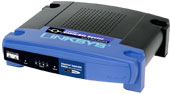
a buddy from a certain 3dfx newsgroup read what i had posted about never having a decent router, so he hooked me up with this router pretty cheap:

it’s a Linksys BEFSR41 v3.
here you can read some of the product information:
http://www.linksys.com/products/product.asp?grid=34&scid=29&prid=561
ive had issues every now and then with dealing with routers…
i guess it started back in 2000 or so when i got DSL.
- when i first got my “PieceOfShit SpeedStream 4060 USB” DSL Modem. i used something like “WinGate” software to share the connection over my network. WinGate or whatever its called didnt like closing connections. refreshing a server list in Half-Life only was able to ping half the servers since the WinGate’s NAT table was full or some shit. it left a connection open to each IP address it pinged and didnt disconnect. Half-Life couldnt ping anymore IPs because all connections were full.
- i didnt have to deal with that for too long, because in 2001, i got a SpeedStream 5260 DSL modem. the 5260 used with the “RASPPPOE” software was a lot better than the USB modem and its shitty proprietary software. i still had to deal with Windows handling all connections (so a PC had to be up and running 24/7 for all other network stuff to work), but i could use things like the Windows built in Internet Connection Sharing to have it act as a router, which worked better than the 3rd party internet sharing/DHCP software i used before.
- a lot of 5260 modems were just 5660 Routers with cippled firmware. lucky for me, my 5260 was really a 5660. flashing it with 5660 firmware enabled router-like features like PPPoE Dialer, DHCP, NAT/firewall/port forwarding stuff, etc. that paired with a cheap hub made a somewhat decent router.
it had issues with resolving DNS though. visiting a site ive been to before the same day would sometimes just totally fail. “unable to find site xxx” or whatever. some games couldnt connect either through it.
- in 2002, i got a Netgear RT314. i purchased it refurbished direct from Netgear. i got one after using the same model at work and seeing all that it could do. it could forward whole ranges of ports, had a Dynmic DNS updater built in, a friendlier web interface, and it of course was a “real” switch, and not a “dumb” hub/repeater like i had been using (better for general PC to PC network traffic). it also was reported by a lot of people to work just fine with all kinds of games.
the Netgear RT314 served me and my family for a long time.
…fast forward to when BitTorrent came out. opening lots of connections with a Torrent made my whole internet connection just DIE. i tried limiting connections and messing with settings, but the Netgear RT314 would just throw up when any number of connection attempts were made with BitTorrent.
no matter what i use, something is always lacking. i had been going with Windows XP w/ its Firewall acting as my home’s router. but after playing with various installs of Linux and x64 Windows (and my computer rebooting several times a day, which of course prevented it from working as good router), i had my Netgear RT314 set up to act as the router. i just queued up a bunch of torrents last night and had to deal with the network going down for everyone because of the Netgear throwing a fit, so i have my 5660 Modem acting as the router right this second. so far, so good.
UPDATE: i got the driver CD, and do not need any more help regarding this

I would really like to get some pictures off a digital camera i have, the thing is - its a no-name camera with no drivers. Windows XP SP1 just detects it as “Camera!” and prompts for drivers, unable to find any itself.
The guy who gave me the camera mentioned the software CD is long-lost. The digital camera is the kind that has internal memory only, no flash cards. So the only way to get the pictures off is to use the USB cable with the correct software.
I’ve tried tons of drivers from different companies, and nothing worked. I tried searching for cameras like it, the company name on it, etc - and nothing helped.
The pictures on the camera are somewhat special, and i do NOT want to lose them.
I have pictures of the camera here, plus info on it:
http://xenomorph.net/digital_camera/
if someone can help me with this by providing a working method to get the pictures off the camera, I will PayPal you $5. dont take paypal? i can arrage for a check then.
